To use your custom indicator in EA Builder, upload it to the list of indicators.


The custom indicator will appear at the end of the list.

The indicator parameters (inputs) will be parsed, but the indicator source will not be saved, and it won't be included in the final EA. All custom indicators must be located in MQL4/Indicators, otherwise you will see "cannot open file..." error messages in the Experts tab on your MetaTrader platform.
Important: Custom indicators used in any EA must be programmed in the new MQL4 language. The MQL4 language has changed significantly since build 600 at the beginning of 2014. Old, incompatible indicators include the functions init() and start(), whereas new indicators include the functions OnInit() and OnCalculate().
Example: Open trade when an arrow appears
Let's say your custom indicator displays blue and red arrows to buy or sell.

We want to create these conditions:
•Buy when a blue arrow appears
•Sell when a red arrow appears
First, upload the indicator. It will appear in the list of custom indicators and the indicator parameters will be parsed.

For the Indicator Buffer parameter, you can choose one of the two indicator buffers: one for the blue arrow and one for the red arrow. More about indicator buffers here. For the blue arrow, we choose the blue buffer. The indicator returns the price level of the arrow, or an "empty value" if there is no arrow.
So the final conditions are:
•Buy order: My Custom Indicator (blue buffer) is not equal to 0
•Sell order: My Custom Indicator (red buffer) is not equal to 0
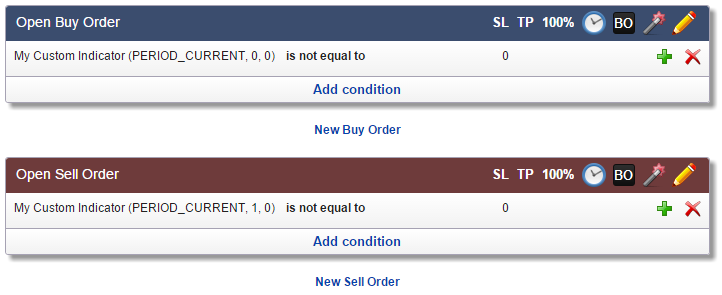
Note: Internally, value "0" translates as "EMPTY_VALUE" or zero, which is the value of an indicator when there is no arrow.
Example: Open trade when an arrow appears on the previous bar
This setup will avoid trades that would be triggered when an arrow appears and then disappears. A trade will be triggered only if there is an arrow when the bar closes.
We will combine the condition Bar Opens and the example above with Shift = 1:
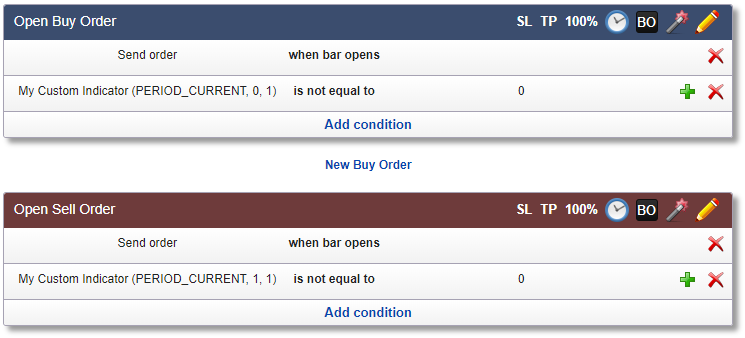
Note: The Shift parameter must be set to 1 in order to refer to the previous bar that has just closed.
Example: Open trade when indicator changes color
Let's say your custom indicator displays red, yellow and green color bars. This is a simplified version of CCI Colored from bonus indicators.

We want to buy when it changes color from yellow to green and sell when it changes color from yellow to red. After uploading the indicator, we see it has three buffers: red, yellow and green.

We will create two conditions for a buy order:
•CCI Custom Color (green buffer) is not equal to 0
i.e., the current color is green
•CCI Custom Color (yellow buffer, Shift: 1) is not equal to 0
i.e., the color at the previous bar is yellow
And for the sell order:
•CCI Custom Color (red buffer) is not equal to 0
i.e., the current color is red
•CCI Custom Color (yellow buffer, Shift: 1) is not equal to 0
i.e., the color at the previous bar is yellow
The indicator with Shift set to 1 returns its value at the previous bar as explained in the previous topic.

 Note that all these examples still need a fix to prevent opening multiple trades within a few ticks: check Maximum Open Trades.