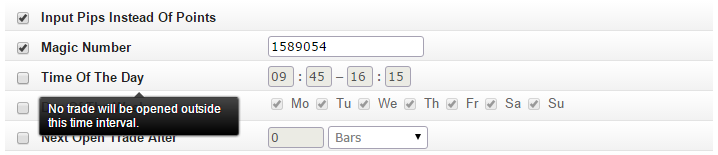
Every feature has a popup-tip with a short explanation.
 Maximum Open Trades should be checked in examples like this or this to prevent multiple trades from opening. When price moves up and down inside a bar, indicators can cross multiple times. Without limiting the number of trades, multiple orders would be sent. Setting Maximum Open Trades to 1 is equivalent to adding the condition: "# Open Trades is equal to 0".
List of all features:
•Input Pips Instead Of Points – Entered pip value will be converted to Point value for 3- and 5-digit symbols. For example, on 5-digit brokers, 1 Point = 0.00001 while 1 Pip = 0.0001 for EUR/USD. With this option, the EA will work properly on both 4- and 5- digit brokers.
•Magic Number – Magic Number is a randomly chosen number that will be associated with each order. It ensures that the EA will not modify or close orders opened by another EA running on the same account. Each EA must have a different Magic Number. Manual trades have zero Magic Number.
•Time Of The Day – No trade will be opened outside this time interval. The broker's time zone is used.
•Day Of The Week – No trade will be opened on days that are not checked.
•Next Open Trade After – No trade will be opened within this time after the previous trade's open / close.
•Next Open Trade After TOD – No trade will be opened until this Time Of the Day (HH:MM) after the previous trade. The broker's time zone is used.
•Maximum Trade Duration – Open trades will be closed if they last longer.
•Minimum Trade Duration – Do not close if open trade lasts less than this time.
•Maximum Spread (Pips) – Trade will not be opened if Bid – Ask spread is greater.
•Maximum Slippage (Pips) – This Input is mandatory when sending order.
•Allow Hedging – Check if you want to open simultaneous long and short positions. Some brokers do not allow it.
•Maximum Open Trades – Maximum simultaneous open trades.
•Maximum Long Trades – Maximum simultaneous long trades.
•Maximum Short Trades – Maximum simultaneous short trades.
•Maximum Pending Orders – Maximum simultaneous pending orders.
•Maximum Long Pending Orders – Maximum simultaneous long pending orders.
•Maximum Short Pending Orders – Maximum simultaneous short pending orders.
•Delete Order At Distance (Pips) – Delete pending order if the current market price moves too far away from it.
•Pending Order Expiration – Delete pending order a certain time after the order was placed.
•Maximum Stop Loss (Pips) – The Stop Loss as set in the opening conditions will be decreased if necessary. Note: Stop Loss must be set in the Open Trade tab.
•Minimum Stop Loss (Pips) – The Stop Loss as set in the opening conditions will be increased if necessary. Note: Stop Loss must be set in the Open Trade tab.
•Maximum Take Profit (Pips) – The Take Profit as set in the opening conditions will be decreased if necessary. Note: Take Profit must be set in the Open Trade tab.
•Minimum Take Profit (Pips) – The Take Profit as set in the opening conditions will be increased if necessary. Note: Take Profit must be set in the Open Trade tab.
•Close At Profit / Loss – Close all trades when Total Open Profit (profit / loss of all open trades at the current time) reaches the threshold in USD or account currency. The threshold can be positive or negative.
•Price Too Close (Pips) – If Stop Loss, Take Profit or Pending Order is too close to the current market price, sending order fails with the error "invalid stops" or "invalid price" on most brokers. Minimum distance set from the current price so the order will be adjusted if necessary.
•Add Custom Functions – Custom functions will be included in the source so that they can be used in Custom Code conditions.