The purpose of Money Management is to control risk by setting a reasonable lot size for each trade. A general rule is that you should never risk more than 5% per trade. Even a series of 10 full losses in a row should never wipe out your account.

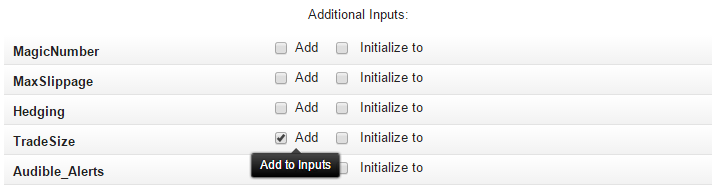
•Fixed Size – Use a fixed number of lots per trade. This is the most typical setup. You can add the Trade Size to Inputs (check out Additional Inputs) and modify its value when running the EA.
Keep in mind that some brokers have a different definition of one lot. The standard definition is 1 lot = 100,000 units, but on microlot accounts, 1 lot = 10,000 units (0.1 of a standard lot).
•Position Sizing – As your account grows, so will the lot size, and vice versa. For example, if you enter "1 Lot per 10000 of account currency" and your account size is $500, then the trade size will be $500 / $10000 = 0.05 lots.
•Risk % Per Trade – Percentage of account size to risk on each trade. This is calculated from Stop Loss, so don't forget to set the Stop Loss for each order! Otherwise, sending order will fail. For example, if your account size is $1000, you want to risk 5% per trade and the EA is going to open a trade on EUR/USD with a Stop Loss of 50 pips, the lot size is calculated as follows:
The maximum risk is 5% of $1000 = $50. The maximum loss of 50 pips is equal to $500 per one standard lot. We will open $50 / $500 = 0.1 lots.
 Risk % Per Trade is compatible with Binary Options where you don't have a Stop Loss. The maximum loss is calculated from Binary Option value instead of Stop Loss.
•Martingale / Anti-Martingale – Martingale multiplies the trade size after each losing trade. Anti-Martingale multiplies the trade size after each profitable trade. Check out the video tutorial on Martingale. Note that the last trade is always remembered in the history when the EA stops. If you want to start the EA again with the initial trade size and ignore the last result from the previous run, change the Magic Number to a different (random) number.
•Custom Code – If you are an experienced MQL4 programmer, you can write your own custom function for special money management.