It is important to understand the difference between is above/below and crosses above/below.
Example 1.

Is above is a continuous signal, which means that the order would be opened every tick as long as the moving average with period 5 was above the moving average with period 20. This would lead to many open trades.
Example 2.

Crosses above is an instant signal, which means that the order is opened just once at the crossover.
This topic is also explained in the video tutorial: How To Create Strategies.
Common Issue: Two crossovers
A common mistake is trying to enter two crossovers within one order. Consider the following example:
•If Moving Average (Period: 5) crosses above Moving Average (Period: 20)
and
•Moving Average (Period: 20) crosses above Moving Average (Period: 50)
then open a buy order.
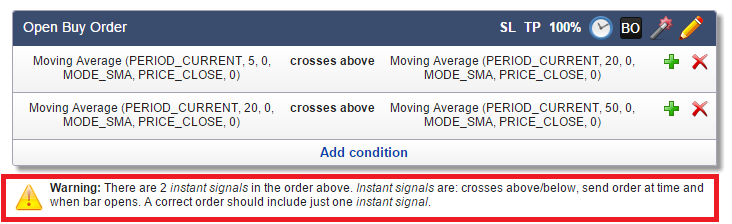
You would see a warning suggesting that it's probably not what you want to do. The conditions mentioned above mean that you would be waiting until two crossovers happen at the same tick – a highly unlikely if not impossible scenario. You have to decide which one of the two conditions is an entry trigger (i.e., you want to enter right at the crossover) and which one is a confirmation (i.e., the crossover has already happened). What you probably want is this:
•As long as Moving Average (Period: 20) stays above Moving Average (Period: 50), wait for another crossover:
•Moving Average (Period: 5) crosses above Moving Average (Period: 20).
Correct:
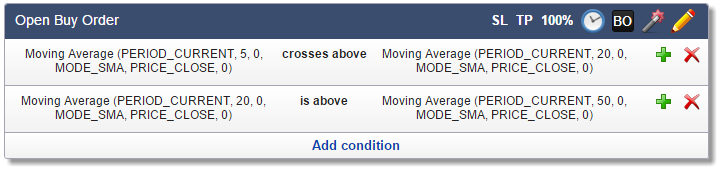
In the above solution, we have decided that the first condition (...crosses above...) is an entry trigger and the second condition (...is above...) is a confirmation.
Note that this example still needs a fix to prevent opening multiple trades within a few ticks: check Maximum Open Trades.